Sie zeigen eine alte Version dieser Seite an. Zeigen Sie die aktuelle Version an.

Unterschiede anzeigen Seitenhistorie anzeigen

« Vorherige Version anzeigen Version 8 Nächste Version anzeigen »

List of new features and enhancements
YearFunction or placeWhat's new
2025Phrases tool

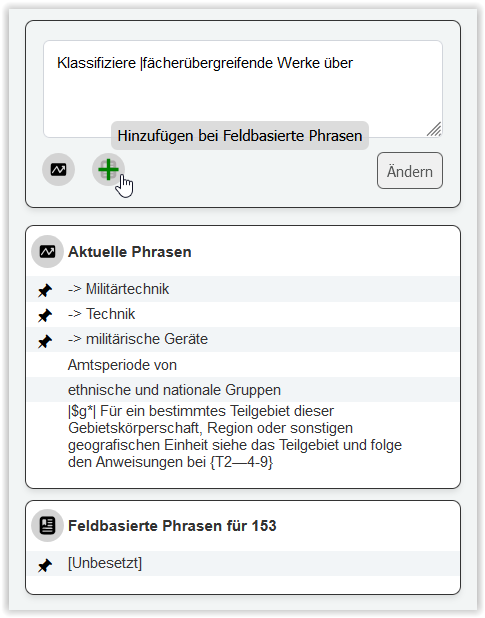
New feature to assist with the translation of recurring terms, i.e., notes, topics, or other text elements.

slightly smiling face Quickly add any type of text to the lists from the input field above. There are two lists that can be filled: Current phrases and field-based phrases.

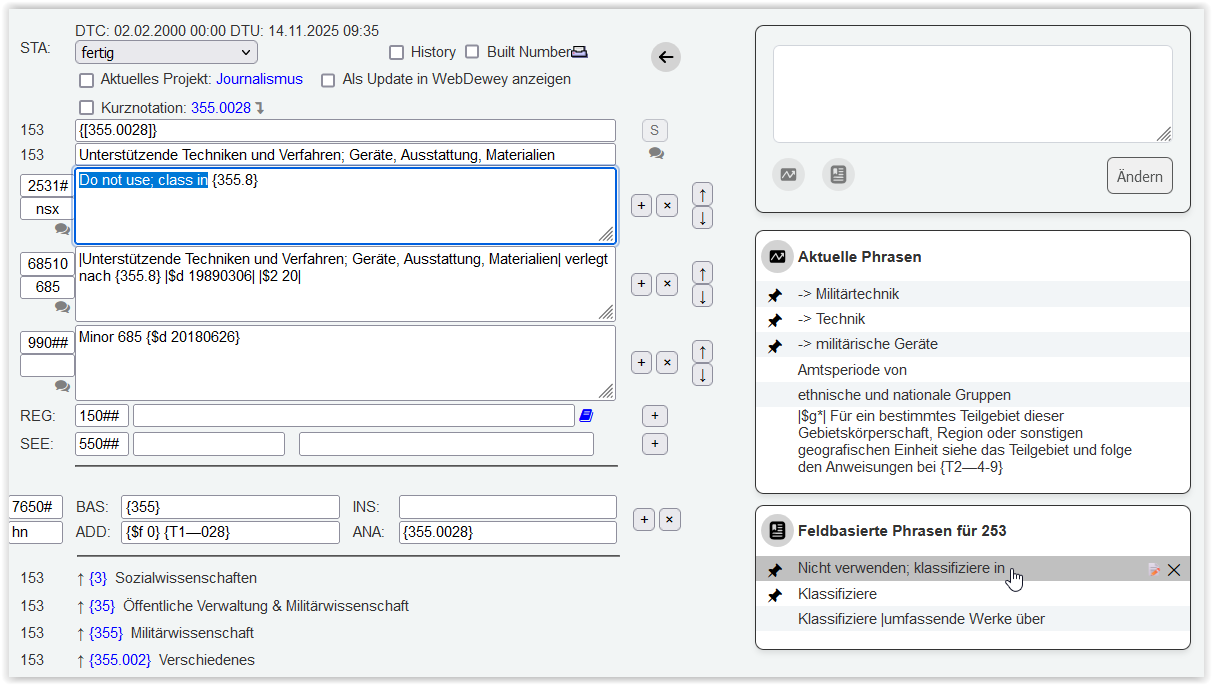
slightly smiling face Quickly insert any listed text to the class record (target language side). Simply mark the text to be replaced and click the item in the list.

Icons for current phrases and field-based phrases:

Current phrases: For recurring phrases that are needed for a short period of time.

This list remains rather short. New terms replace those that are (currently) no longer needed.

Field-based phrases: For recurring phrases that always appear in the same field on the translation screen.

These "permanent" items do not change over a long period of time.

You can change and replace the texts, and you can pin phrases that are most important for your workflow.

How to pin:

Current Phases: Clicking on the pin icon moves the term to the top position. Deactivating and activating the pin also moves the term to the top position. Newly inserted terms are pinned directly to the top position.

Field-based phrases: Clicking on the pin icon moves the term to the top of the list. Deactivating and activating the pin moves the term to the top of the list. Newly added terms are sorted alphabetically.


Please note:

The use of the phrase tools is not tied to the user. This means that adding, pinning, and changing items in the lists always affects the list, regardless of who is working in the translation software.

This behavior primarily affects current phrases: another user may be working in a different subject field and may therefore use different current phrases. Here, coordination within your team may be helpful.


2024New color concept in search results and lists (projects window, other windows)
  • New color concept for the display of English records in search results and all other lists where such a distinction is possible.

For example:

    • Global search: all results found on the English side are shown in red color. All results found in the target language are displayed in blue color. Results found in both languages, double in the results and are presented in red and blue side by side.
    • New records are always displayed in red color, as long as they haven't been saved yet on the target language side. Their status is always displayed as "new".
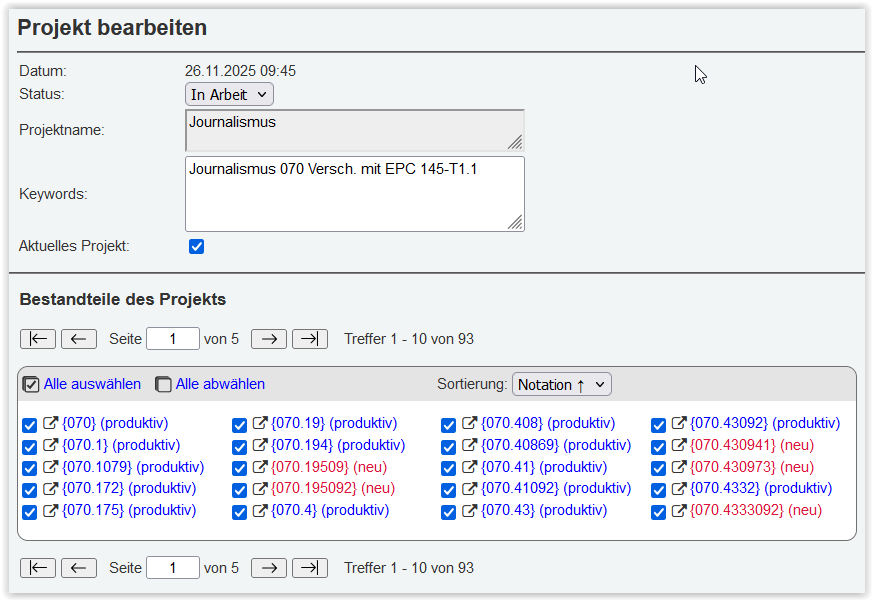
    • In the project window, results that have already been edited or have the status "productive", are displayed in blue color. New records that haven't been touched yet, are shown in red color and have status "new".
  • Search for records with status "new" (status:new). This status indicates that a record has never been touched or saved on the target language side. Status "new" is also shown in all other lists for this type of records. New records are always displayed in the color red (according to the new color concept).
  • Searches for English-only content, i. e. for content that exists on the English side but not on the target language side: This also makes it possible to search for EPC exhibits in field 990. All numbers that contain a specific exhibit information (e.g., EPC EPC 143-T1.2) will be found and can easily be added to a project by using the "projects" button in the top menu.


2024Projects window
  • Sorting options by status, notation
  • Page iterators enable to scroll pages or jump to a page
  • The precise amount is given for the number of records in a project
  • "Refresh" and "Save": Improved logic:
    • REFRESH: updates any change made to the record itself, including status.
    • SAVE: updates changes made in the projects window, including changes to keywords and adding or removing the checkboxes for "current project" and "is/is not part of project".


2024Statistics page
  • Automatic refresh when loading the page: The moment you open the statistics page, the statistics data is automatically updated. You find the date and time of the last update at the top of the page (UTC time standard).
  • Search by number range: can be applied for most of the statistics categories.
  • Lists remain stable and can be refreshed any time you want to see your work progress.
  • Page iterators to enable scrolling and jumping to any page in the list.


  • Keine Stichwörter